



Technology is always making it easier and speeding up the difficult task but errors always kill our confidence, so we are here to discuss the “Exchange is currently in recovery mode” error.
MS Outlook 2003 and it’s new versions includes a feature named Cached Exchange mode, this new feature is an improved version of the offline folders. Cached Exchange mode provides various solutions to make synchronization, one of them is Exchange recovery mode.
Sometimes users want Offline mode, Cached Exchange Mode is the best option to work in offline mode. Here, Outlook will save a copy of data on the local system(OST format). This file will save the same copy that is previously on the Exchange Server. In some cases, users may be facing this error when a user tries to synchronize Offline Storage (OST) files with Exchange Server.

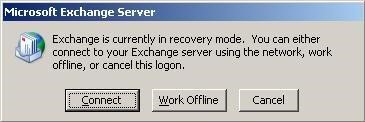
The Reasons behind Error Exchange is Currently in Recovery Mode
Below mentioned are some of the major reasons for this error.
- When there are occurring inconsistencies in Mailbox and Exchange server.
- In some cases, users reset the Exchange Server. But, the mailbox holding the cached Exchange mode enabled, a fresh OST file is generated by Outlook and holds the old offline OST data on the local system.
- Migrating the Mailbox from the older version to the latest version.
- Slow network connection in a client and server.
- Issued in DNS configuration and settings.
Understanding the reasons behind this error, so let’s take a look at the methods to resolve this error.
How can we Fix the ‘Exchange is Currently in Recovery Mode’ Error?
Now, we are discussing the solution part of this error. This error can be resolved by various methods.
1. By Disabling the cached Exchange mode
- First, Launch the MS Outlook.
- Then, click on Tool.
- Now, pick the Settings.
- After, choose the Mail Account.
- In the right sidebar, hit on the Change icon.

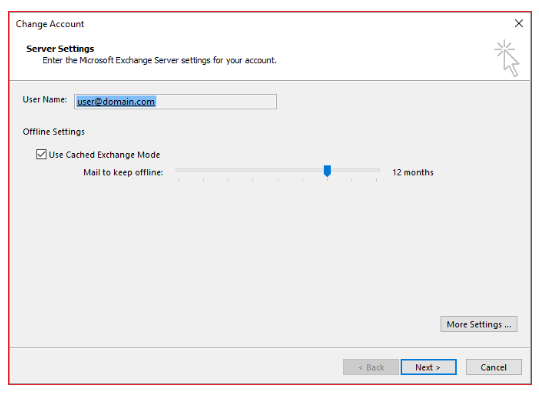
- Therefore, disable Use Cached Exchange Mode in MS Exchange Server option
- In the following, delete the Offline OST file.
- Then, press the Mail tab.
- Now, click the Profile menu and delete it.
- Lastly, you need to create a new profile.
2. By creating a New Offline Folder file
When you modify the Exchange Server, then you need to create a new OST file because the current OST file might not resemble the new Exchange Server properly. Below are the steps to create a new OST file:
- First, open your control panel.
- Then, click on the Mail option.
- Now, choose the Show File, a new window is open.

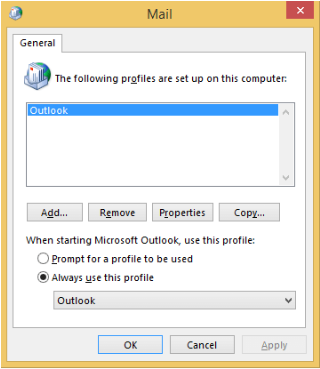
- In the following step, hit the Add button, then add a new profile.
- In the end, tap Ok.
3. By using Professional Method
If any of the above methods do not work properly, then redo the process again following every single step because there is no such direct solution available to fix the error.
Following the above approach may increase the level of inconsistencies in the resultant file, so here is an alternate way to resolve all types of errors in the OST file of MS Outlook. So, the users must download a third-party software named Exchange EDB to PST. With the assistance of this tool, you can recover your damaged OST file as well as save Exchange OST files into various file formats.
Conclusion
No one likes errors, this small error Exchange is currently in recovery mode creates a big problem for users so, consider the above three methods to fix the error. In this blog, we acknowledged the users about the reasons behind this error and different approaches for solving it. You can use any of the above methods, but the third method is more efficient and convenient. So, we recommend you to choose a professional method. Hope this blog will help you resolve this error.