


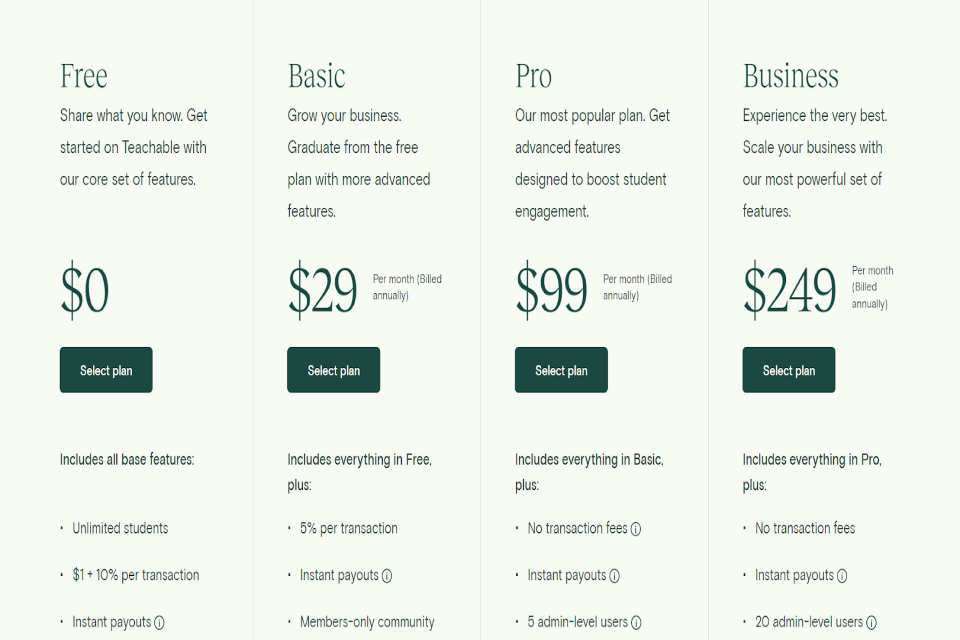
The Teachable Pricing Plan has a large number of tools that will allow you to gain first-hand expertise in the construction and management of online courses. They will take care of the technical issues, allowing you to concentrate on designing the content of your course.
This platform gives you access to an infinite video bandwidth, an unlimited number of students, email support, coaching services, live coaching services, course design templates, and connectivity with a number of different payment methods.
In addition to that, it gives you a variety of price options for the courses you take. You have the ability to sell in a number of different currencies, with a number of different price options, and even to set subscriptions and payment plans.
Teachable is aware of the significance of both the evaluation and feedback provided by students. The ability to create quizzes and surveys is available to course authors even on the free plan of this platform.
You do not need to be concerned about having to pay taxes if you have your primary residence in the United States or any of the nations that are part of the European Union. Teachable takes care of all applicable taxes, including US sales tax and EU value-added tax, automatically.
Cons of Teachable Pricing Plans
The Teachable Free Plan does have certain restrictions, particularly for those course designers who have been successful in establishing a flourishing company for themselves. Therefore, it is in your best interest to switch away from this plan as soon as you are able to do so.
As is typical with online course platforms, the platform offers the free plan solely to provide a functional way for you to evaluate it.
This platform does not allow you to send coupons or work with affiliate partners, and it takes $1 plus 10% of each transaction you make. These marketing methods are effective, but the free plan prevents you from exploring them in any further detail.
online course platforms
In addition, the free plan allows only one admin user. It also restricts you to using only the Teachable subdomain for your courses.
This indicates that the end of your domain name will be changed to include teachable.com. That would be yourschool.teachable.com, if you will. This kind of domain does not give off a professional appearance, which might hinder the expansion of your company.
You are not permitted to provide upsells for lectures, either. This implies that if you have more than one course available on the platform, you are unable to market similar courses to your students in an effort to entice them into making an additional purchase.
Even though the Teachable free plan enables you to administer basic quizzes to your pupils, you are unable to provide feedback on their performance.
Quizzes and graded assessments help your pupils evaluate their own abilities more effectively. This will encourage them to put in more effort and pay closer attention to what you are teaching them.
Drip course content is not supported by the Teachable Free Plan at this time. It implies that you are unable to arrange your lectures and deliver them in stages, which may have an impact on the level of participation shown by the students.
In addition, you are unable to provide your students with certificates, which is another factor that might undermine the legitimacy of your online course.
Keeping these restrictions in mind, I believe it would be best for you to switch to a premium plan as soon as you are able to do so financially.
As an online course designer, you will find that the additional capabilities that come with subscription programmes are beneficial to your development.
Teachable Overview
Paid plans on Teachable can be purchased on either a monthly or yearly basis, with either option including an annual membership. The following is a rundown of the various price options offered by Teachable.
The chart above shows that when a company bills you yearly, it gives you a large discount. That indicates that you will accumulate more savings.
Let’s take a look at how much money you can put away in a year using these strategies.
The chart above shows that selecting the Annual Billing option significantly increases the amount of money you save.
If you don’t want to make a significant financial commitment right away, monthly memberships are a fantastic option.
Now that we have everything out of the way, let’s have a look at the basic plan and the features that come included with it.
Paid Plans on Teachable
If you wish to upgrade from the Free plan but do not yet have the financial means to pay for a higher plan, the Teachable Basic Plan is an excellent alternative to consider.
If, on the other hand, the development of online courses is more of a passion or a supplementary source of income for you rather than a primary source of income, this option is ideal for you.
You have access to essential elements that will provide a professional air to your company’s operations.
On the other hand, the site does deduct a five percent fee from each sale that you generate.
Suppose you are asking $200 for a class that you are teaching.
Based on the findings of the study shown above, Teachable deducts $10 from each purchase rather than $21 if you are on the Free Plan. It could seem like a good value when you first take a look at it.
However, if you are not producing a sufficient amount of sales each month, it is possible that it will not be worth it.
End
Keeping in mind that our training costs $ 200, let’s assume that you earn 10 sales per month. You will ultimately be responsible for the transaction costs totaling $100.
On the other hand, the Pro Plan, which costs $99 a month, does not collect a commission from any sales that you make. Put the processing charge to one side; you should receive the whole amount of your earnings.
You can clearly see that sticking on the Basic Plan can end up costing you money in the long run. On the other hand, if you just make a few sales each month, it is in your best interest to go with the Basic Plan because you will end up saving more money this way.
Before you opt into this plan, track your sales for a month to see whether the total transaction charge is larger than the monthly membership cost of the Pro Plan.