Running a WooCommerce store involves much more than accepting payments and processing orders. Store owners must generate invoices, packing slips, credit notes, shipping labels, delivery notes, picklists, address labels, proforma invoices, quotations, and other documents required throughout the order fulfilment process. When these documents are created manually, businesses may experience delays, inconsistent formatting, missing information, and avoidable administrative errors.
WooCommerce stores must also manage responsibilities related to taxes, customer consent, VAT information, order records, withdrawal requests, data protection, backups, and internal accountability. The right combination of plugins can automate these processes and create a more organized workflow for customers, warehouse employees, accounting teams, and store administrators.
1. WooCommerce PDF Invoices, Packing Slips and Credit Notes
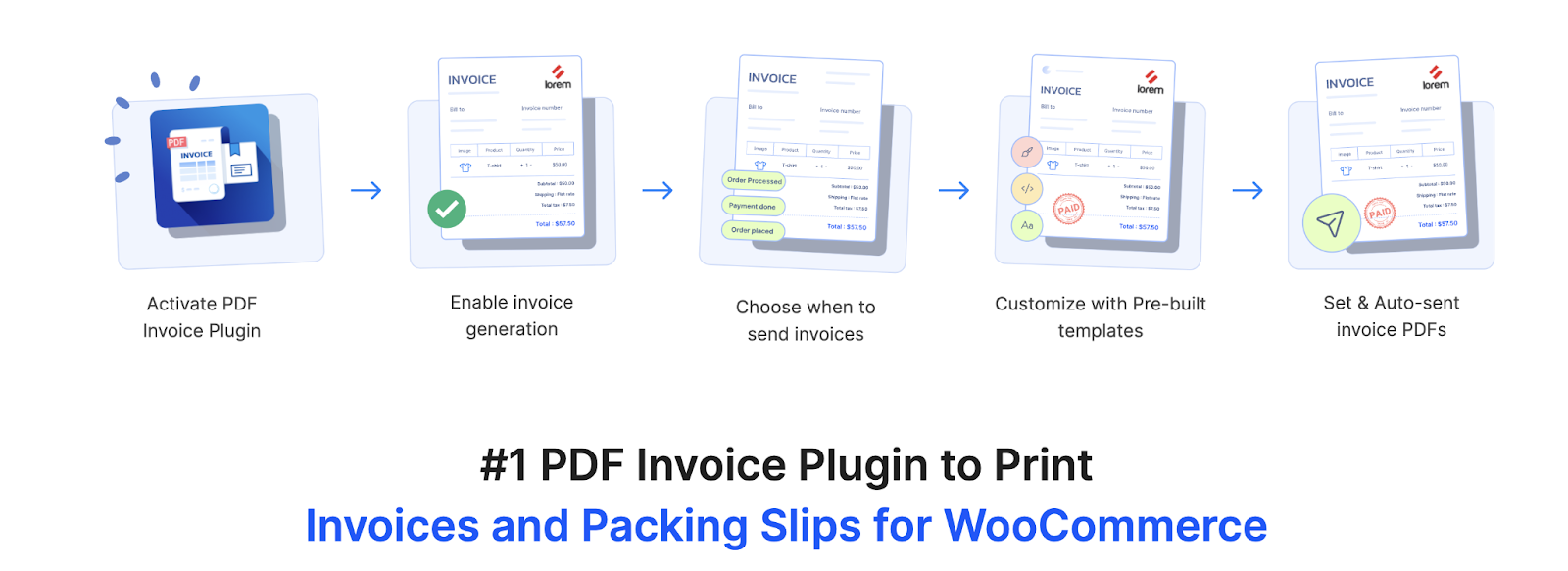
WooCommerce PDF Invoice helps store owners automatically generate professional invoices and other essential order documents. The plugin can create PDF invoices, packing slips, and credit notes using the information available in WooCommerce orders. These documents can be attached to selected order emails, downloaded from the order administration area, printed individually, or processed in bulk.
Store owners can customize document templates with their company logo, business address, tax details, payment information, customer details, product data, and additional order fields. The plugin also supports custom invoice-number formats, multilingual documents, RTL languages, customer invoice downloads, bulk document exports, and electronic invoice formats. It is suitable for businesses that want to manage customer invoices, warehouse documents, and refund records through one connected system. A free version is also available for stores that need basic invoice and packing-slip generation features. It is suitable for businesses that want to manage customer invoicing and order documentation more efficiently.
2. WooCommerce Tax
WooCommerce Tax is a complementary plugin that calculates the sales tax that should be collected during checkout. While the WebToffee invoice plugin creates the final invoice and displays the applicable tax information, WooCommerce Tax helps determine the tax amount based on the store address and the customer’s location. This reduces the need to create and maintain tax-rate tables manually.
Accurate tax calculation is important because the values displayed on invoices must correspond with the amount collected from the customer. By combining automated tax calculation with a professional invoice-generation plugin, store owners can create a more consistent workflow from checkout to final documentation. However, merchants should confirm that WooCommerce Tax supports the countries and tax requirements relevant to their business.
3. WooCommerce Shipping Labels, Dispatch Labels and Delivery Notes
The WooCommerce Shipping Labels, Dispatch Labels and Delivery Notes plugin by WebToffee helps store owners generate operational documents for packing and delivering orders. It can automatically create shipping labels, dispatch labels, and delivery notes from WooCommerce order information. Administrators can print documents from individual orders or select multiple orders and process the documents in bulk.
The plugin provides customizable templates for including billing and shipping addresses, return addresses, payment details, product information, order totals, product attributes, and custom metadata. Multiple labels can be arranged on a single page, and store owners can adjust the size and layout according to their printing requirements. The plugin generates internal shipping documents from order details but does not purchase carrier postage.
4. Advanced Shipment Tracking for WooCommerce
Advanced Shipment Tracking complements shipping and delivery documents by adding carrier and tracking information to WooCommerce orders. Once a package has been prepared and dispatched, store administrators can add its tracking number and shipping provider. The tracking details can then appear in the customer’s order email and My Account area.
This creates a more complete fulfilment workflow. WebToffee can generate the documents used to prepare and dispatch the package, while Advanced Shipment Tracking communicates the shipment’s progress to the customer. Providing an accessible tracking link may also reduce customer enquiries about shipment status and expected delivery.
5. WooCommerce Proforma Invoices
WooCommerce Proforma Invoices by WebToffee enables businesses to generate preliminary invoices before a transaction is finalized. A proforma invoice can show the proposed products, quantities, prices, shipping charges, taxes, and expected total. It is useful for wholesale sales, custom orders, international transactions, bank transfers, and purchases that require approval before payment.
The plugin can automatically generate proforma invoices when an order reaches a selected status and attach them to WooCommerce emails. Store owners can customize the appearance and content of the document according to their business requirements. This helps businesses clearly distinguish preliminary payment information from the final commercial or tax invoice created after the transaction is confirmed.
6. WooCommerce Deposits
WooCommerce Deposits complements proforma invoices by allowing customers to pay an initial deposit or follow a structured payment plan. This is particularly useful for expensive products, customized goods, bookings, manufacturing orders, and B2B purchases that do not require full payment immediately.
Store owners can create payment schedules using percentages, fixed amounts, and intervals measured in days, weeks, or months. Customers may be allowed to choose between paying the full amount and using a deposit plan. The proforma invoice can communicate the proposed transaction, while WooCommerce Deposits manages how the customer pays the agreed amount.
7. WooCommerce Picklists
WooCommerce Picklists generates organized picking documents for warehouse and fulfilment teams. Each picklist shows the products and quantities that employees must collect before an order can be packed. Picklists can be generated according to order status and accessed directly through the WooCommerce administration area.
The plugin supports bulk printing and can attach picklists to selected internal emails. Products may be organized by order, category, or other useful criteria, while SKUs, variations, quantities, and product information can be displayed to reduce confusion. A standardized picking process can help growing stores decrease fulfilment errors and prepare multiple orders more efficiently.
8. ATUM Inventory Management for WooCommerce
ATUM Inventory Management complements picklists by helping businesses maintain accurate stock information. Before warehouse employees begin picking products, the store needs reliable information about quantities, product locations, SKUs, suppliers, purchasing, and inbound inventory. ATUM provides a centralized Stock Central interface for managing these details.
The plugin allows store teams to edit inventory-related information and monitor product availability from one dashboard. Depending on the store’s configuration and selected add-ons, it can also support purchase orders, suppliers, inventory locations, and additional inventory-management workflows. Used alongside picklists, it can connect stock planning with the physical collection of products for customer orders.
9. Product Import Export Plugin for WooCommerce
The Product Import Export Plugin for WooCommerce by WebToffee helps store owners efficiently transfer, migrate, update, and manage large volumes of product data. It supports CSV, XML, Excel, TSV, and Google Sheets, allowing products to be imported from local files, public URLs, or FTP locations. The plugin works with simple, variable, grouped, external, subscription, and custom product types while retaining important information such as product images, prices, stock quantities, categories, attributes, variations, custom fields, and metadata. Its column-mapping feature allows users to match fields from differently structured import files with the correct WooCommerce product fields and save those configurations as reusable templates.
The plugin also makes it easier to maintain and update growing WooCommerce catalogues. Store owners can export selected products using filters such as product type, category, tag, SKU, price, stock status, quantity, and creation date. Existing products can be updated in bulk by editing exported data in Excel or Google Sheets and importing it again, with products matched using their SKU or ID. Scheduled imports and exports through FTP or SFTP can automate recurring supplier updates, inventory synchronisation, catalogue backups, and product-data transfers. Additional capabilities include importing and exporting product reviews, maintaining detailed activity logs, exporting product images separately, and automatically generating missing product descriptions through a ChatGPT API integration.
10. WooCommerce Shipping
WooCommerce Shipping complements WebToffee Address Labels by allowing eligible merchants to purchase and print carrier postage labels. While the WebToffee plugin creates customizable address labels from order data, WooCommerce Shipping connects the fulfilment process with supported shipping carriers and discounted commercial postage rates.
Merchants can compare available label rates, purchase postage, print carrier-approved labels, and generate tracking numbers from the WooCommerce dashboard. Carrier availability may differ according to the merchant’s location. The two plugins can therefore serve separate purposes: one for customizable address documentation and the other for purchasing and printing actual postage labels.
11. Customizer for WooCommerce PDF Invoices
The Customizer for WooCommerce PDF Invoices is an add-on that gives store owners advanced control over the appearance of documents generated by supported WebToffee plugins. It includes a drag-and-drop editor and block-based customization options, allowing businesses to modify documents without manually editing template code.
The add-on can customize invoices, packing slips, credit notes, proforma invoices, shipping labels, dispatch labels, delivery notes, and picklists. Store owners can adjust page layouts, move fields, add information, modify visual elements, and create templates that match their branding. This is particularly useful when different departments or markets require documents with specialized layouts. Store owners can further adjust page and design properties such as padding, background color, text size, text color, line spacing, border style, and border color. These controls make it easier to create documents that remain consistent with the store’s visual identity and are clear for customers, warehouse staff, delivery teams, and accounting departments. Elements that are not required can be removed to make documents more concise and improve their readability.
12. WPML Multilingual & Multicurrency for WooCommerce
WPML Multilingual & Multicurrency for WooCommerce complements document customization by supporting international stores that operate in multiple languages and currencies. It can help merchants translate products, shop pages, checkout content, customer-facing text, and other important parts of the WooCommerce shopping journey.
When used with compatible document plugins, the store can create a more consistent multilingual experience from the product page to the final order documentation. The plugin also supports multiple currencies and localized payment options. This is valuable for businesses that want customers to browse, purchase, and receive order communications in an appropriate language and currency.
13. QR Code Add-on for WooCommerce PDF Invoices
The QR Code Add-on for WooCommerce PDF Invoices allows store owners to place QR codes on invoices generated through the compatible WebToffee invoice plugin. The code can contain relevant invoice or order information, helping users access or verify encoded details by scanning the document.
QR codes can support invoice identification, internal processing, customer payments, or region-specific invoice requirements. Because the add-on extends the WebToffee PDF invoice system, it is intended for stores already using the main invoice plugin. Merchants operating in regulated markets should confirm the precise format and information their invoice QR codes are expected to contain. Businesses operating in countries with mandatory invoice QR code standards should verify the applicable technical and legal requirements before using the generated codes for compliance purposes. The add-on creates generic QR codes containing selected invoice or order data and may not automatically support every country-specific format or encoding standard.
14. EU VAT Number for WooCommerce
EU VAT Number complements invoice QR codes and invoice tax fields by collecting and validating business VAT numbers during checkout. The plugin adds a VAT-number field and validates eligible numbers against the European Commission’s VAT Information Exchange System.
It can also support VAT exemption for qualifying business customers and help stores handle location evidence for relevant transactions. Once the VAT number has been collected and validated, the information can be stored with the WooCommerce order and displayed on compatible invoice documents. This helps connect checkout validation with accurate tax documentation.
15. Sequential Order Numbers for WooCommerce
Sequential Order Numbers for WooCommerce by WebToffee gives stores a dedicated and organized order-numbering system. WordPress normally uses the same database sequence for orders, pages, posts, media, and other content, which can result in visible gaps between WooCommerce order IDs.
The plugin allows merchants to assign sequential numbers and customize them with starting values, prefixes, suffixes, date information, and other formatting rules. Although order numbers and invoice numbers may serve different purposes, an organized order-number sequence makes it easier to search for transactions, communicate with customers, prepare documents, and maintain internal references. The premium plugin provides additional control over how the sequence progresses. Merchants can define custom increments so that numbers increase by values such as two, five, or ten instead of the standard increment of one. The numbering sequence can also be automatically reset daily, monthly, or yearly. This allows businesses to begin a new sequence for each reporting period while incorporating the relevant date into the order-number format. Stores that prefer one uninterrupted sequence can leave automatic resetting disabled or reset the sequence manually when required.
16. WP Activity Log
WP Activity Log complements sequential order numbering by recording changes and user activity within WordPress and WooCommerce. Clear order numbers help identify transactions, while an activity log can show which administrator or employee changed a product, order, plugin, setting, or other important store information.
The plugin can record user logins, failed login attempts, content changes, plugin updates, and WooCommerce-related activities. Premium capabilities include reports, notifications, external log storage, and user-session management. This provides additional accountability for stores with multiple administrators, warehouse employees, developers, or customer-support representatives.
17. GDPR Cookie Consent Plugin
The GDPR Cookie Consent plugin by WebToffee helps websites collect and manage visitor consent before activating non-essential cookies and tracking technologies. It can display a customizable banner with accept, reject, and preference controls and can organize cookies into appropriate categories.
The plugin includes features such as cookie scanning, consent logging, policy-generation support, and integrations for services including Google Consent Mode. This is particularly useful for WooCommerce stores that use analytics, advertising pixels, embedded content, and remarketing services. Proper configuration is still necessary because installing a consent plugin alone does not guarantee legal compliance. WebToffee’s plugin supports Google Consent Mode v2, including basic and advanced consent configurations. Website owners can define default consent states by region, enable URL passthrough, use debugging options, redact advertising data, and configure Consent Mode through WebToffee’s Google Tag Manager template. Consent choices can therefore be communicated to supported Google services so that tags operate according to the permission granted by each visitor.
18. WP Consent API
WP Consent API complements WebToffee’s cookie banner by creating a standardized method through which compatible WordPress plugins can communicate consent information. It does not display a cookie banner or collect consent by itself. Instead, it helps supported plugins understand the consent status recorded by a consent-management platform
The API supports category-level and service-level consent information. This can help ensure that analytics, marketing, embedded-content, and other plugins respond consistently to a visitor’s preferences. Used with a compatible consent banner, it provides an additional technical communication layer between the system collecting consent and the plugins that may set cookies or process tracking information.
19. WebToffee EU Order Withdrawal Button for WooCommerce
WebToffee EU Order Withdrawal Button for WooCommerce gives customers a structured way to submit withdrawal requests through an online store. Eligible customers can access a withdrawal option, select an entire order or individual products, provide the necessary information, and confirm their request through a guided process.
Store administrators receive a dedicated dashboard for viewing, filtering, approving, or rejecting requests. The plugin also supports email notifications, guest-order verification, configurable withdrawal periods, activity records, product exclusions, and withdrawal links or shortcodes. It provides technical functionality intended to support online withdrawal procedures, but merchants should obtain professional guidance regarding the requirements that apply to their business.
20. Germanized for WooCommerce
Germanized for WooCommerce complements the WebToffee withdrawal plugin by adding several features commonly required for stores operating in the German market. These include delivery-time information, unit pricing, tax and shipping notices, legal checkboxes, and options for attaching relevant legal information.
The premium version provides additional functionality, including PDF documents, legal-text generators, and features related to VAT and One Stop Shop workflows. Germanized addresses broader German-market requirements, while the WebToffee plugin provides a dedicated withdrawal-request process. Neither plugin should be treated as a substitute for advice from a qualified legal professional.
21. Order Status Manager for WooCommerce
Order Status Manager complements automatic document printing by letting businesses create custom statuses that reflect their internal fulfilment process. Standard WooCommerce statuses may not adequately represent steps such as awaiting approval, sent to warehouse, picking in progress, ready for printing, packed, awaiting collection, or quality checked.
The plugin allows administrators to create, edit, arrange, and delete custom statuses. Store owners can add icons, action buttons, bulk actions, customer-facing descriptions, and emails triggered by status changes. These statuses can help employees understand when an order is ready for document generation, printing, packing, dispatch, or another internal process.
22. WooCommerce Request a Quote
WooCommerce Request a Quote by WebToffee allows customers to submit quotation requests instead of immediately completing the standard checkout process. Store owners can add a Request a Quote button, hide prices, or replace the Add to Cart button for selected products, categories, tags, user roles, or customer groups.
Administrators can manage quote requests from a centralized dashboard, negotiate pricing, approve or reject proposals, and convert accepted quotations into WooCommerce orders. The plugin is suitable for wholesale products, customized items, bulk orders, professional services, and products whose final price depends on customer requirements. The plugin includes a quote-only mode that can hide product prices and remove or replace the standard Add to Cart button. Store owners can also control access according to WordPress user roles or restrict quotation requests to registered customers. These options are particularly useful for stores that want negotiated prices or quotation facilities to be available only to approved wholesale or business customers. The text, position, background, border, and text colour of quote-related buttons can also be customized to suit the store’s design.
23. WooCommerce Product Add-Ons
WooCommerce Product Add-Ons complements a quotation system by allowing customers to provide the information needed to price or prepare a customized product. Store owners can add text boxes, dropdown menus, checkboxes, image selections, file-related options, gift messages, donations, and paid upgrades to product pages.
For example, a customer requesting a quotation for a customized product could select the preferred material, add engraving text, choose optional services, or provide other relevant requirements. These selections give the merchant more information when reviewing the quotation. Add-ons can be priced using flat fees, percentages, or quantity-based charges, depending on the configuration.
24. Order Import and Order Export Plugin for WooCommerce
The Order Import and Export plugin by WebToffee helps merchants transfer, update, archive, and manage WooCommerce order data. Orders can be imported or exported using file formats such as CSV, XML, TSV, and Excel, making the plugin useful for migrations, reporting workflows, accounting transfers, and record management.
Store owners can use filters to export only the required orders and can create saved templates for repeated processes. Scheduled exports can reduce the manual work involved in transferring order information to external systems or storage locations. The plugin can also help businesses retain structured copies of important order records outside the active WooCommerce dashboard. The plugin also supports scheduled order imports and exports through FTP or SFTP profiles. Store owners can configure recurring processes to run daily, weekly, or at custom intervals, reducing the need to transfer files manually each time. This can be useful when order information must be regularly shared with another store, transferred to an external workflow, or stored separately as part of a backup or record-management process.
How to Choose the Right Plugins
The most appropriate combination depends on the size, location, and operating model of the WooCommerce store. A small business may need only PDF invoices, tax calculation, shipping documents, shipment tracking, and cookie consent. A wholesale or B2B business may also require proforma invoices, deposits, quotations, VAT validation, custom product fields, and sequential order numbers.
Stores with dedicated fulfilment teams may benefit from picklists, inventory management, address labels, postage printing, custom order statuses, and remote document printing. International businesses may need multilingual content, multiple currencies, localized invoice fields, electronic invoice formats, VAT numbers, withdrawal tools, and market-specific compliance features.
Store owners should also avoid installing plugins merely because they offer a large number of features. Each plugin should solve a clearly identified requirement and should be tested for compatibility, performance, security, and support for WooCommerce’s current order-storage system. Document numbering, tax settings, invoice formats, retention periods, privacy notices, and withdrawal procedures should be reviewed with appropriate legal or accounting professionals.
Conclusion
Managing invoices, order documents, fulfilment records, and compliance requirements is essential for maintaining an efficient WooCommerce store. Each stage of the order process, from quotations and payment to warehouse handling, shipping, invoicing, and post-purchase requests, depends on accurate documentation and well-organized workflows.
By choosing tools that support different operational needs without unnecessarily duplicating features, store owners can reduce manual work, improve accuracy, and maintain better control over their daily processes. A carefully planned plugin setup can help create a more reliable, scalable, and professional store-management system while improving the experience for both staff and customers.