The first time someone mentioned API testing in a meeting, I nodded along like I understood. I really didn’t. It took me embarrassingly long to actually look it up. So this is the article I wish I had found back then. No jargon, no assumed knowledge, just a straightforward explanation of what API testing is and why so many tech teams treat it as a priority.
What Is an API?
Before getting into testing, it helps to understand what an API actually is. Think of it like a waiter at a restaurant. You don’t go into the kitchen yourself. You tell the waiter what you want, they pass the order along, and eventually your food arrives. An API does the same job for software. It carries requests from one system to another and brings back a response. This is happening behind the scenes of almost every app you use daily.
So What Is API Testing?
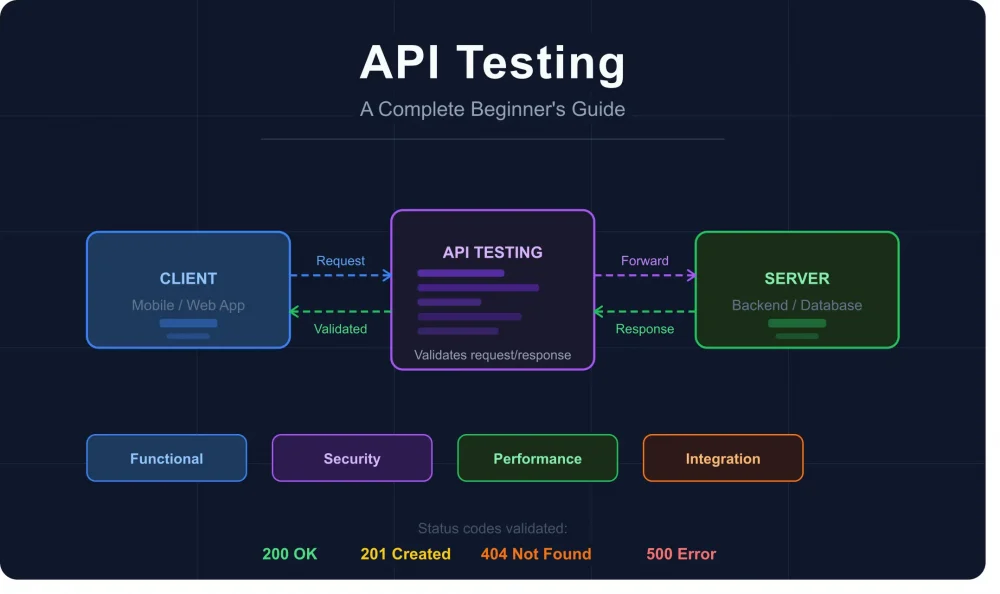
API testing is the process of checking that those behind-the-scenes conversations between software systems are actually working correctly. Is the right data going out? The right data coming back? Is it secure? Fast enough? Handling errors properly?
The big difference from regular software testing is that there’s no interface involved. You’re not clicking buttons or checking screen layouts. You’re testing the data layer directly. A quick example: your app requests order details for ID 5091. API testing checks whether the correct details come back, in the right format, within a reasonable time, and only to someone who’s actually allowed to see them.
Why Does It Actually Matter?
APIs break in ways that aren’t obvious until real users are already affected. A developer makes a small backend change. Seems harmless. But it accidentally changes the date field format in the response. The frontend cannot handle the new format, so it breaks. Users encounter errors, support teams receive more tickets, and developers waste hours figuring out what went wrong.
Good API tests running automatically would have flagged that immediately. Beyond catching bugs early, testing also helps teams:
- Test core logic without waiting for a finished user interface
- Catch regressions the moment code changes are pushed
- Verify that authentication and data security are working properly
- Confirm the API holds up when traffic spikes unexpectedly
The Main Types of API Testing
Functional Testing
The baseline check. You send a request and verify the response is what it should be, with valid inputs, invalid inputs, and missing fields all covered.
Load Testing
Simulates thousands of users hitting the API at once. Many apps that run fine normally fall apart under real traffic. Better to find that out in testing than during a product launch.
Security Testing
Checks whether authentication is solid and whether someone can access data they shouldn’t. With data privacy laws getting stricter globally, this one isn’t optional anymore.
Integration Testing
Modern apps are made of multiple services wired together. Integration testing checks that data flows correctly between them end to end, not just within each service in isolation.
How to Get Started
You don’t need to be a developer to try it. A simple starting path:
• Download Postman for free. It has a visual interface and needs no coding to get started
• Practice with a public API like JSONPlaceholder. It’s free and needs no account
• Send a basic GET request and read the response
• Deliberately break something. Remove a required field and see how the API responds
• Once comfortable, look into automating your tests using Python or JavaScript
To Wrap Up
API testing used to feel like a specialist concern. These days it’s a basic requirement for any team shipping software that actually works reliably. Understanding what it is puts you in a much better position, whether you’re a developer, a tester, or just someone curious about how good software gets built.
If you want to go deeper on the technical side, the Keploy blog has a thorough guide toAPI testing that covers HTTP methods, status codes, tools and a lot more. Worth reading once you have the basics down.